Window Functions: Ranking, Running Totals, and Trends
Beyond Basic SQL Queries
For many business analysts, SQL starts with the basics: SELECT, WHERE, GROUP BY, and JOINs. These tools are powerful, but as datasets grow larger and business questions become more complex, traditional SQL often feels limiting. How do you calculate a running total without creating multiple subqueries? How do you rank employees within their departments without writing dozens of separate queries? How do you detect trends over time in a single clean dataset? The answer lies in one of SQL’s most powerful yet often underused features: window functions. Window functions enable analysts to perform advanced calculations across sets of rows while still retaining row-level detail. Unlike aggregate functions, which collapse rows into summaries, window functions allow you to keep the granularity of data while adding new layers of insight, whether it’s ranking, calculating running totals, or identifying trends. In this post, we’ll break down window functions in detail, explore their real-world applications, and show how mastering them can make you a more effective, strategic business analyst.What Are Window Functions?
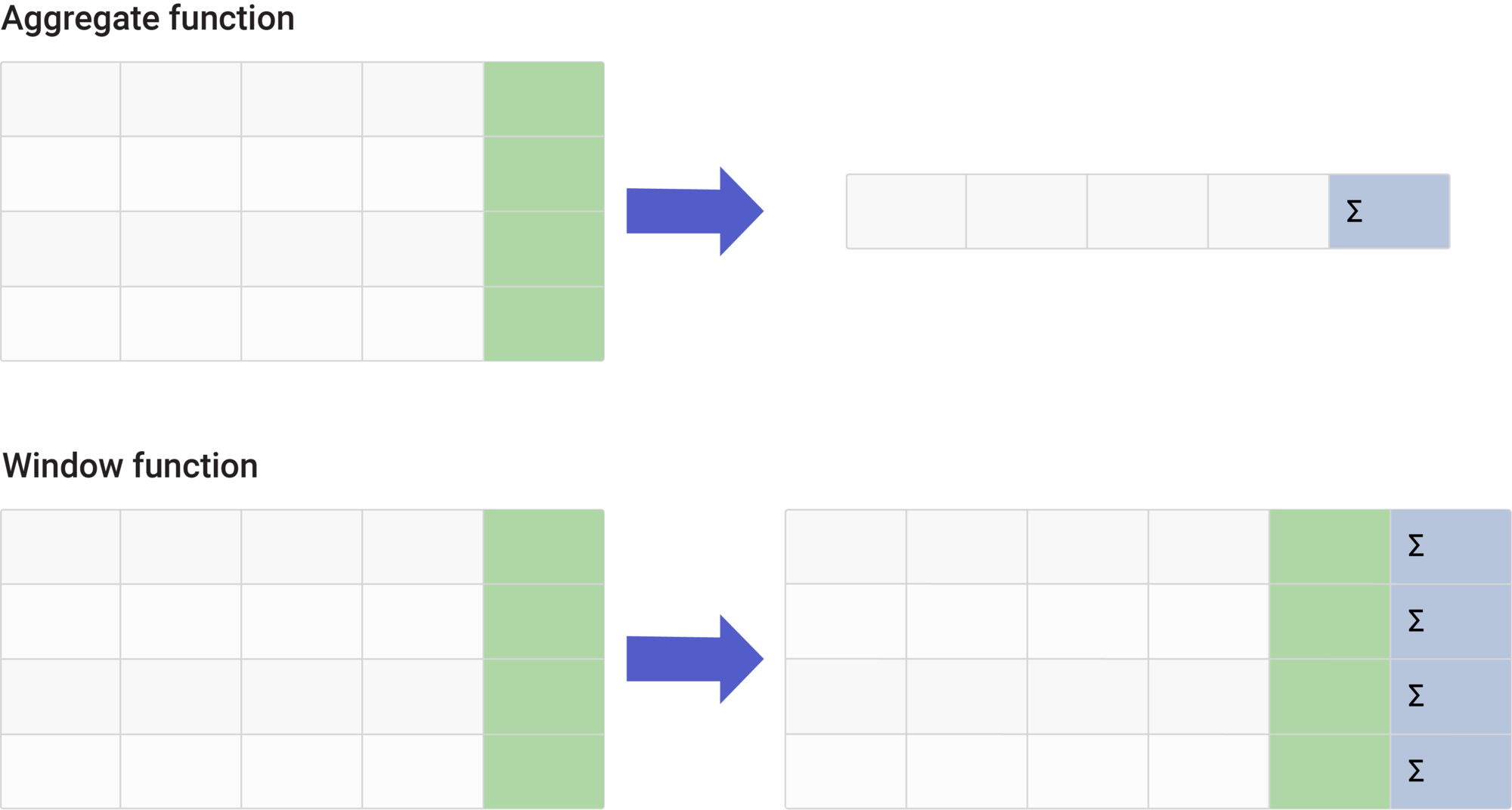
 A window function performs a calculation across a “window” of rows that are related to the current row. The result is returned for each row, without collapsing rows into a single value (as happens with GROUP BY).
The key part of a window function is the OVER() clause, which defines how the window is partitioned (grouped) and ordered.
Basic Syntax:
function_name (expression)
OVER (PARTITION BY column ORDER BY column)
Here’s a breakdown:
A window function performs a calculation across a “window” of rows that are related to the current row. The result is returned for each row, without collapsing rows into a single value (as happens with GROUP BY).
The key part of a window function is the OVER() clause, which defines how the window is partitioned (grouped) and ordered.
Basic Syntax:
function_name (expression)
OVER (PARTITION BY column ORDER BY column)
Here’s a breakdown:
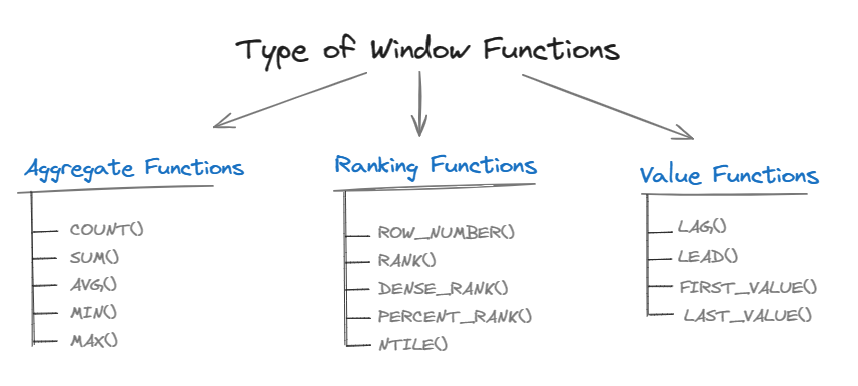
- function_name – This could be RANK(), ROW_NUMBER(), SUM(), AVG(), etc.
- PARTITION BY – Splits the data into groups (like GROUP BY).
- ORDER BY – Defines the sequence of rows within each partition.
Why Business Analysts Should Care About Window Functions
 Business analysts often need to answer questions like:
- Who are the top 5 performers in each sales region?
- What is the cumulative revenue month over month?
- How does customer churn trend over time?
Ranking with Window Functions
The Problem:
You want to rank sales reps by revenue, but you also need to see their raw sales numbers.Solution: Using RANK() or ROW_NUMBER()
SELECT employee_id, region, revenue, RANK() OVER (PARTITION BY region ORDER BY revenue DESC) AS rank_in_region FROM sales_team;Explanation:
- PARTITION BY region ensures each region is ranked separately.
- ORDER BY revenue DESC ranks by highest revenue first.
- RANK() assigns equal rank to ties, while ROW_NUMBER() assigns unique sequential numbers.
Real-World Example:
An analyst could use this to compare sales reps within regions and identify top performers for recognition or bonus distribution.Running Totals with Window Functions

The Problem:
You want to calculate cumulative revenue month by month, instead of just total revenue per month.Solution: Using SUM() OVER()
SELECT month, SUM(revenue) OVER (ORDER BY month ROWS BETWEEN UNBOUNDED PRECEDING AND CURRENT ROW) AS running_total FROM monthly_sales;Explanation:
- The window function calculates the cumulative sum of revenue up to the current month.
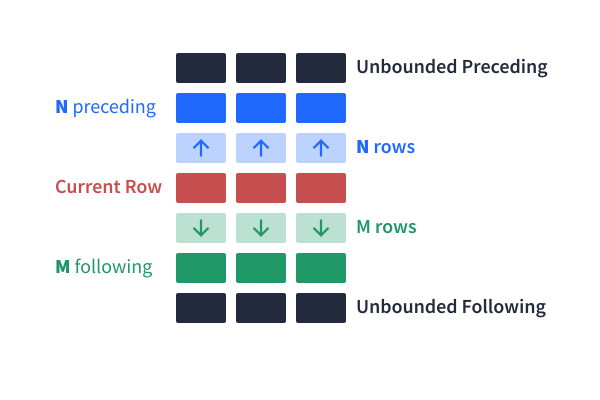
- The ROWS BETWEEN UNBOUNDED PRECEDING AND CURRENT ROW clause defines the running window.
Real-World Example:
Finance teams often use running totals to compare year-to-date performance against targets.Trends with Window Functions
The Problem:
You want to measure growth by comparing each month’s sales to the previous month.Solution: Using LAG() or LEAD()
SELECT month, revenue, LAG(revenue, 1) OVER (ORDER BY month) AS prev_month, revenue – LAG(revenue, 1) OVER (ORDER BY month) AS month_change FROM monthly_sales;Explanation:
- LAG(revenue, 1) returns the previous month’s revenue.
- Subtracting it from the current month reveals growth or decline.
- LEAD() works similarly but looks forward instead of backward.
Real-World Example:
Marketing teams can use this to track the impact of campaigns on monthly sales trends.Combining Ranking, Running Totals, and Trends
Often, analysts need to use multiple window functions together. Example: Find the top 3 products by sales, their cumulative contribution, and month-over-month growth. WITH product_sales AS ( SELECT product_id, month, SUM(revenue) AS monthly_revenue FROM sales GROUP BY product_id, month ) SELECT product_id, month, monthly_revenue, RANK() OVER (PARTITION BY month ORDER BY monthly_revenue DESC) AS rank_in_month, SUM(monthly_revenue) OVER (PARTITION BY month ORDER BY monthly_revenue DESC) AS running_total, monthly_revenue – LAG(monthly_revenue) OVER (PARTITION BY product_id ORDER BY month) AS revenue_change FROM product_sales; This kind of query provides a holistic view, not just who sold the most, but how their performance trends over time and how much they contribute cumulatively.Best Practices for Using Window Functions
- Be mindful of partitions. Over-partitioning can create performance issues.
- Choose the right function. Use RANK() when ties matter, ROW_NUMBER() when they don’t.
- Explain your logic. Window functions are powerful but can be intimidating add comments for clarity.
- Test with subsets. Run queries on smaller data before scaling to full datasets.
- Combine with CTEs. CTEs + window functions = cleaner, more readable queries.
Common Pitfalls Analysts Make
- Confusing RANK() vs ROW_NUMBER(): RANK() allows ties, ROW_NUMBER() doesn’t.
- Forgetting ORDER BY: Without it, window functions may return unpredictable results.
- Performance bottlenecks: Window functions are powerful but computationally heavy optimize indexes where possible.
Real-World Business Applications
- Sales Performance: Ranking reps by performance, calculating YTD totals, tracking growth rates.
- Customer Analytics: Identifying top customers by spend, monitoring churn trends.
- Finance: Calculating running account balances, comparing quarterly growth.
- Operations: Tracking service response times, identifying bottlenecks.