Why Data Cleaning Matters More Than Ever
Data is no longer just a record of transactions; it’s the foundation of decision-making. Yet, what many organizations fail to realize is that raw data is rarely ready for analysis. Before any dashboard can tell a story or any model can predict an outcome, that data must be cleaned, structured, and standardized.
This is where the power of SQL data cleaning comes in.
Whether you’re a business analyst preparing data for Power BI, a data engineer building pipelines, or a data scientist running predictive models, you’ll face messy datasets full of missing values, duplicates, and inconsistent formatting. These small issues can lead to misleading results, wrong KPIs, or even poor business decisions.
Therefore, understanding how to handle NULLs, remove duplicates, and fix formatting issues using SQL isn’t just a technical skill, it’s a professional necessity.
In this post, we’ll explore practical SQL techniques for data cleaning, complete with examples, use cases, and best practices. By the end, you’ll have a clear roadmap for turning dirty data into reliable insights.
Understanding the Data Cleaning Process

Before diving into SQL queries, it’s important to understand what data cleaning actually involves.
Data cleaning, sometimes called data scrubbing, is the process of detecting and correcting (or removing) inaccurate, incomplete, or irrelevant parts of the dataset. It ensures consistency, accuracy, and usability of the data.
At its core, data cleaning answers three key questions:
- Are there missing values (NULLs) that could distort averages or totals?
- Are there duplicate records that might inflate counts or misrepresent performance?
- Are there formatting inconsistencies that could break joins or visualizations later?
Each of these issues can seriously impact analysis. Let’s explore how to tackle them effectively using SQL.
Handling NULL Values in SQL
In SQL, NULL represents an unknown or missing value. It’s not zero, not blank, and not an empty string it literally means “no value exists.”
Why does this matter? Because NULL behaves differently in SQL operations. For instance, mathematical operations or comparisons involving NULLs don’t return TRUE or FALSE; they return NULL.
So, without handling them, your results could become inaccurate.
Detecting NULLs
To identify missing data in a table, you can use the IS NULL condition.
SELECT *
FROM customers
WHERE phone_number IS NULL;
This query returns all rows where the phone_number column is missing.
You can also find rows where multiple fields are missing:
SELECT *
FROM customers
WHERE email IS NULL OR address IS NULL;
This helps analysts see where data collection or entry needs improvement.
Replacing NULLs with Meaningful Values (COALESCE and ISNULL)

Once you’ve identified NULLs, you often need to replace them with something meaningful like a default value, a calculated average, or a placeholder.
There are two main SQL functions used for this: COALESCE() and ISNULL() (in SQL Server).
Example using COALESCE():
SELECT customer_id,
COALESCE(phone_number, ‘Not Provided’) AS phone_number
FROM customers;
Here, any NULL phone numbers are replaced with “Not Provided.”
If you’re dealing with numeric fields, you might replace NULLs with 0:
SELECT order_id,
COALESCE(discount, 0) AS discount
FROM orders;
The COALESCE() function can take multiple arguments and returns the first non-NULL value.
Handling NULLs in Aggregations
Aggregations like SUM(), AVG(), and COUNT() handle NULLs differently. For example, COUNT(column) ignores NULLs, but COUNT(*) counts all rows.
To get accurate results, consider using COALESCE() within aggregation functions:
SELECT region,
SUM(COALESCE(sales, 0)) AS total_sales
FROM orders
GROUP BY region;
This ensures that missing sales values are treated as zero, maintaining accurate totals.
Practical Example: Handling Missing Demographic Data
Imagine a marketing analyst analyzing customer data. The “age” column has missing values. If those NULLs aren’t handled, calculating the average customer age will be misleading.
By replacing NULLs with the average age, we maintain a realistic dataset:
UPDATE customers
SET age = (SELECT AVG(age) FROM customers WHERE age IS NOT NULL)
WHERE age IS NULL;
This imputation strategy helps maintain integrity while preventing data loss.
Removing Duplicates in SQL
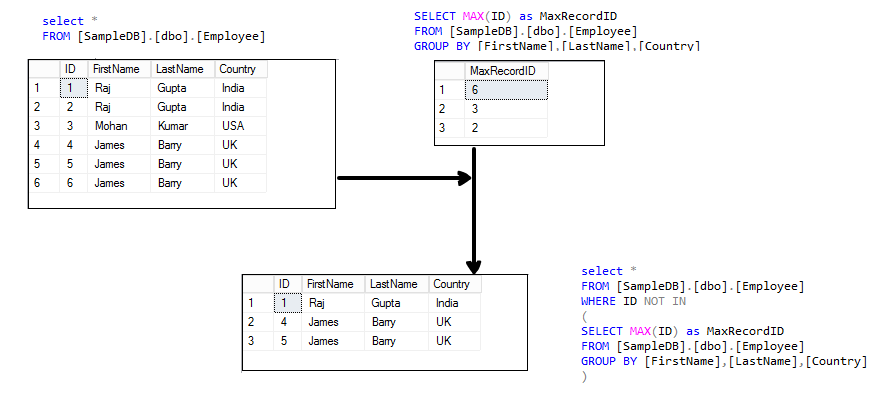
Duplicate records are one of the most common causes of reporting errors. They can appear when data is merged from multiple sources, entered manually, or imported incorrectly.
For example, duplicate customer entries might inflate revenue or misrepresent customer count.
Therefore, every analyst must know how to detect and remove duplicates efficiently.
Finding Duplicates
To find duplicates, use GROUP BY with HAVING COUNT(*) > 1.
SELECT customer_email, COUNT(*) AS occurrences
FROM customers
GROUP BY customer_email
HAVING COUNT(*) > 1;
This query lists all duplicate email addresses, indicating potential data quality issues.
Deleting Duplicates (Modern Approach)
Once you’ve identified duplicates, you can remove them while keeping one unique record.
Here’s one of the safest approaches using Common Table Expressions (CTEs):
WITH duplicates AS (
SELECT *,
ROW_NUMBER() OVER (
PARTITION BY customer_email
ORDER BY customer_id
) AS row_num
FROM customers
)
DELETE FROM duplicates
WHERE row_num > 1;
Explanation:
- The ROW_NUMBER() function assigns a sequential number to each duplicate record.
- The PARTITION BY clause groups by customer_email.
- Only the first instance (row_num = 1) is kept; all others are deleted.
Alternative: Keeping Duplicates but Flagging Them
Sometimes, it’s better to flag duplicates for review rather than delete them immediately.
SELECT customer_id, customer_email,
CASE WHEN COUNT(*) OVER (PARTITION BY customer_email) > 1 THEN ‘Duplicate’
ELSE ‘Unique’ END AS record_status
FROM customers;
This allows analysts to manually inspect duplicate entries before making irreversible deletions.
Practical Example: Duplicates in Sales Data
Imagine a sales dataset where some orders were accidentally imported twice. If we sum revenue, the total will be inflated.
Using GROUP BY and HAVING, you can detect duplicates:
SELECT order_id, COUNT(*) AS duplicates
FROM sales
GROUP BY order_id
HAVING COUNT(*) > 1;
Then, apply a CTE-based removal query to clean the data before analysis.
Fixing Data Formatting Issues
![A Complete Guide to Fix Formatting Issues in Excel [2025]](https://images.wondershare.com/repairit/aticle/2022/02/fix-formatting-issues-in-excel.jpg)
Formatting inconsistencies can break joins, lead to mismatched results, or cause inaccurate reporting.
For example:
- Names might appear in different cases: “John Doe” vs “john doe”.
- Dates might use different formats.
- Numeric fields might be stored as text.
Cleaning these ensures your data is both readable and reliable.
Trimming Extra Spaces
Extra spaces often come from data entry errors or copy-pasting.
UPDATE customers
SET customer_name = TRIM(customer_name);
This removes leading and trailing spaces. In older SQL versions, use LTRIM(RTRIM()).
Fixing Case Sensitivity
To make names or text consistent:
UPDATE customers
SET customer_name = INITCAP(customer_name);
(Note: INITCAP() works in Oracle and PostgreSQL. In SQL Server, use string functions.)
Alternatively:
SELECT UPPER(city_name) AS city
FROM customers;
Use UPPER() or LOWER() for uniform capitalization essential for joining datasets from multiple sources.
Converting Data Types
Sometimes, numeric data gets stored as text or dates as strings.
Use CAST() or CONVERT() to fix them.
UPDATE sales
SET amount = CAST(amount AS DECIMAL(10,2));
Or for date fields:
UPDATE orders
SET order_date = CONVERT(DATE, order_date, 103);
Always ensure data types match before performing calculations or joins.
Standardizing Date Formats
Inconsistent date formats can disrupt reports and time-based aggregations.
To ensure uniformity:
SELECT CONVERT(VARCHAR, order_date, 23) AS formatted_date
FROM orders;
This converts all dates to YYYY-MM-DD, a widely accepted format for BI tools.
Practical Example: Cleaning Product Names
A retail analyst finds product names like “ iPhone13 ”, “IPHONE 13”, and “iphone13”.
These inconsistencies cause multiple entries for the same item.
To standardize:
UPDATE products
SET product_name = TRIM(LOWER(REPLACE(product_name, ‘ ‘, ”)));
This query removes spaces, trims whitespace, and converts all text to lowercase for uniform matching.
A Case Study
Imagine you’re a business analyst preparing a dataset for a Power BI sales dashboard. The raw data has the following issues:
- Missing sales amounts (NULLs)
- Duplicate customer records
- Inconsistent region names (“North-west”, “north west”, “NORTHWEST”)
You’d approach it systematically:
Step 1 – Handle Missing Values
UPDATE sales
SET sales_amount = COALESCE(sales_amount, 0);
Step 2 – Remove Duplicates
WITH clean_customers AS (
SELECT *,
ROW_NUMBER() OVER (
PARTITION BY customer_email
ORDER BY customer_id
) AS rn
FROM customers
)
DELETE FROM clean_customers WHERE rn > 1;
Step 3 – Fix Formatting
UPDATE regions
SET region_name = UPPER(REPLACE(region_name, ‘-‘, ‘ ‘));
Once complete, your data is clean, reliable, and ready for visualization.
The result? Faster queries, accurate KPIs, and a smoother analytics workflow.
Best Practices for Data Cleaning

- Never clean directly on production data. Always test on a backup or staging environment first.
- Document your transformations. Others should understand what changed and why.
- Use version control for SQL scripts. Track your cleaning history like code.
- Automate recurring cleanups. Use scheduled scripts or stored procedures.
- Validate after cleaning. Run sanity checks to confirm accuracy.
Clean Data = Confident Insights
Data cleaning isn’t glamorous, but it’s the backbone of every successful analytics project.
As a business analyst or data professional, your insights are only as good as your data. By learning how to handle NULLs, duplicates, and formatting issues with SQL, you gain control over data quality and credibility.
Clean data ensures accurate dashboards, trustworthy KPIs, and confident business decisions.
So the next time you’re troubleshooting a report or questioning strange results, remember:
It’s not always the analysis that’s wrong; it’s the data that’s dirty.